

The Prototype pattern is a creational design pattern that enables the creation of new objects by cloning an existing object (the prototype) rather than instantiating it from scratch using a constructor. It is particularly effective when object creation is expensive, complex, or requires preserving state.
Core Intent
“Specify the kinds of objects to create using a prototypical instance, and create new objects by copying this prototype.”
This promotes efficiency and flexibility by avoiding repetitive initialization logic.
When to Use Prototype
| Scenario | Use Case |
|---|---|
| Object creation is costly (e.g., DB query, file I/O) | Cache and clone pre-configured instances |
| Objects have many configuration combinations | Avoid deep constructor chains |
| Need runtime object duplication with modifications | Clone and tweak |
| Want immutable base + mutable clones | Clone → mutate safely |
| State preservation across instances | Clone with current state |
Avoid when:
- Object creation is trivial → Use new
- Deep cloning is complex → Risk of unintended sharing
Where It Is Used in Real Systems
| Domain | Example |
|---|---|
| Game Development | Clone enemies, items, levels |
| Document Editors | Clone paragraphs, tables, styles |
| UI Components | Clone complex widgets with state |
| Configuration Management | Clone app settings per environment |
| E-Commerce | Clone order templates, product variants |
Key Benefits
- Performance: Avoids expensive setup
- Flexibility: Runtime object variation
- Reduced subclassing: No need for factory per variant
- State preservation: Clone retains current values
- Dynamic registration: Add prototypes at runtime
Real-World Example: E-Commerce Order Template System
An e-commerce platform uses pre-configured order templates for different customer segments:
- Standard → Default tax, free shipping over ₹500
- Premium → 5% discount, express shipping
- Corporate → Bulk pricing, invoice billing
Instead of recreating these configurations every time, we:
- Pre-build prototype instances
- Clone them per order
- Customize order-specific data (customer, items)
C# Implementation
using System;
using System.Collections.Generic;
using System.Linq;

// ==================== PROTOTYPE INTERFACE ====================

public interface IOrderTemplate
{
    IOrderTemplate Clone();
    void ApplyTo(Order order);
    string Description { get; }
}

// ==================== CONCRETE PROTOTYPES ====================

public class StandardOrderTemplate : IOrderTemplate
{
    public string Description => "Standard Customer Template";

    // Deep-cloneable configuration
    private readonly List<string> _defaultPromotions = new() { "Free shipping over ₹500" };
    private readonly decimal _taxRate = 0.18m;
    private readonly bool _expressShipping = false;

    public IOrderTemplate Clone()
    {
        // MemberwiseClone for value types; deep clone collections if needed
        return (IOrderTemplate)this.MemberwiseClone();
    }

    public void ApplyTo(Order order)
    {
        order.TaxRate = _taxRate;
        order.IsExpress = _expressShipping;
        order.Promotions.AddRange(_defaultPromotions);
        Console.WriteLine($"[Prototype] Applied {Description}");
    }
}

public class PremiumOrderTemplate : IOrderTemplate
{
    public string Description => "Premium Customer Template";

    private readonly List<string> _defaultPromotions = new() { "5% Loyalty Discount", "Free Express Shipping" };
    private readonly decimal _taxRate = 0.18m;
    private readonly bool _expressShipping = true;
    private readonly decimal _discountRate = 0.05m;

    public IOrderTemplate Clone()
    {
        var clone = (PremiumOrderTemplate)this.MemberwiseClone();
        // Deep clone mutable fields
        clone._defaultPromotions = new List<string>(this._defaultPromotions);
        return clone;
    }

    public void ApplyTo(Order order)
    {
        order.TaxRate = _taxRate;
        order.IsExpress = _expressShipping;
        order.DiscountRate = _discountRate;
        order.Promotions.AddRange(_defaultPromotions);
        Console.WriteLine($"[Prototype] Applied {Description}");
    }
}

public class CorporateOrderTemplate : IOrderTemplate
{
    public string Description => "Corporate Bulk Template";

    private readonly List<string> _defaultPromotions = new() { "Volume Pricing", "30-day Invoice" };
    private readonly decimal _taxRate = 0.18m;
    private readonly bool _expressShipping = true;
    private readonly decimal _bulkThreshold = 10;

    public IOrderTemplate Clone()
    {
        var clone = (CorporateOrderTemplate)this.MemberwiseClone();
        clone._defaultPromotions = new List<string>(this._defaultPromotions);
        return clone;
    }

    public void ApplyTo(Order order)
    {
        order.TaxRate = _taxRate;
        order.IsExpress = _expressShipping;
        order.Promotions.AddRange(_defaultPromotions);
        if (order.Items.Sum(i => i.Quantity) >= _bulkThreshold)
            order.DiscountRate = 0.15m; // 15% bulk discount
        Console.WriteLine($"[Prototype] Applied {Description}");
    }
}

// ==================== DOMAIN MODEL ====================

public class Order
{
    public string OrderId { get; set; }
    public string CustomerName { get; set; }
    public List<OrderItem> Items { get; } = new();
    public decimal TaxRate { get; set; }
    public decimal DiscountRate { get; set; }
    public bool IsExpress { get; set; }
    public List<string> Promotions { get; } = new();

    public decimal Subtotal => Items.Sum(i => i.Subtotal);
    public decimal Tax => Subtotal * TaxRate;
    public decimal Discount => Subtotal * DiscountRate;
    public decimal Total => Subtotal + Tax - Discount + (IsExpress ? 100m : 50m);

    public override string ToString()
    {
        return $"Order {OrderId} | Items: {Items.Count} | Total: {Total:C} | Promotions: {Promotions.Count}";
    }
}

public class OrderItem
{
    public string ProductName { get; set; }
    public int Quantity { get; set; }
    public decimal UnitPrice { get; set; }
    public decimal Subtotal => Quantity * UnitPrice;
}

// ==================== CLIENT WITH PROTOTYPE REGPQISTRY ====================

public class OrderProcessor
{
    private readonly Dictionary<string, IOrderTemplate> _prototypes = new();

    public OrderProcessor()
    {
        // Register prototypes at startup (could be from config/DB)
        RegisterPrototype("standard", new StandardOrderTemplate());
        RegisterPrototype("premium", new PremiumOrderTemplate());
        RegisterPrototype("corporate", new CorporateOrderTemplate());
    }

    public void RegisterPrototype(string key, IOrderTemplate prototype)
    {
        _prototypes[key] = prototype;
    }

    public Order CreateOrder(string templateKey, string orderId, string customerName, List<(string name, int qty, decimal price)> items)
    {
        if (!_prototypes.TryGetValue(templateKey, out var prototype))
            throw new ArgumentException($"Unknown template: {templateKey}");

        var order = new Order
        {
            OrderId = orderId,
            CustomerName = customerName
        };

        foreach (var (name, qty, price) in items)
        {
            order.Items.Add(new OrderItem { ProductName = name, Quantity = qty, UnitPrice = price });
        }

        // Clone prototype and apply
        var clonedTemplate = prototype.Clone();
        clonedTemplate.ApplyTo(order);

        return order;
    }
}

// ==================== DEMO ====================

class Program
{
    static void Main()
    {
        var processor = new OrderProcessor();

        Console.WriteLine("=== PROTOTYPE PATTERN IN E-COMMERCE ===\n");

        // Create orders by cloning templates
        var order1 = processor.CreateOrder("standard", "ORD-1001", "Rahul Sharma",
            new List<(string, int, decimal)>
            {
                ("T-Shirt", 2, 499m),
                ("Jeans", 1, 1299m)
            });

        var order2 = processor.CreateOrder("premium", "ORD-1002", "Priya Singh",
            new List<(string, int, decimal)>
            {
                ("Laptop", 1, 65000m),
                ("Mouse", 1, 799m)
            });

        var order3 = processor.CreateOrder("corporate", "ORD-1003", "ABC Corp",
            new List<(string, int, decimal)>
            {
                ("Monitor", 15, 12000m),
                ("Keyboard", 15, 1500m)
            });

        Console.WriteLine(order1);
        Console.WriteLine(order2);
        Console.WriteLine(order3);
    }
}Sample Output
=== PROTOTYPE PATTERN IN E-COMMERCE ===

[Prototype] Applied Standard Customer Template
[Prototype] Applied Premium Customer Template
[Prototype] Applied Corporate Bulk Template
Order ORD-1001 | Items: 2 | Total: ₹1,970.62 | Promotions: 1
Order ORD-1002 | Items: 2 | Total: ₹62,489.82 | Promotions: 2
Order ORD-1003 | Items: 2 | Total: ₹1,92,270.00 | Promotions: 2UML Class Diagram
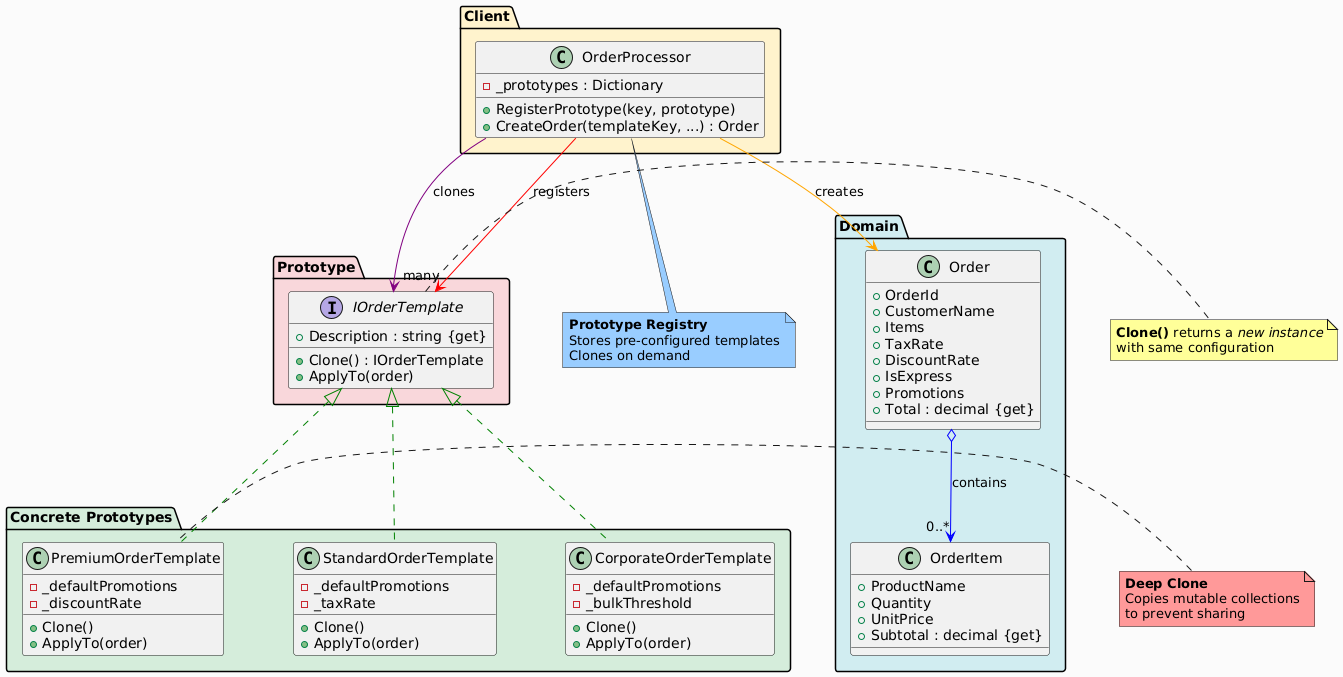
Participants in the Prototype Pattern
The classes and objects participating in this pattern include:
- Prototype (IOrderTemplate)
- Declares an interface for cloning itself.
- ConcretePrototype (StandardOrderTemplate, PremiumOrderTemplate, CorporateOrderTemplate)
- Implements the cloning operation.
- Usually performs a deep copy to avoid reference sharing.
- Client (OrderProcessor)
- Maintains a registry of prototypes.
- Clones a prototype and customizes it.
Summary Table
| Participant | Role in E-Commerce Example |
|---|---|
| Prototype | IOrderTemplate – defines Clone() |
| ConcretePrototype | StandardOrderTemplate, PremiumOrderTemplate, CorporateOrderTemplate |
| Client | OrderProcessor – registry + cloning logic |
Advantages in E-Commerce
| Benefit | Impact |
|---|---|
| Fast setup | Clone pre-loaded templates |
| Configurable | Add new templates at runtime |
| Safe mutation | Clone → modify per order |
| Reduced DB calls | Cache templates in memory |
Prototype vs Factory Method
| Aspect | Prototype | Factory Method |
|---|---|---|
| Creation | Clone existing | new in subclass |
| State | Preserves state | Starts fresh |
| Use Case | Config-heavy objects | Type variation |
| Performance | Faster (no setup) | Slower (setup each time) |
Conclusion
The Prototype pattern is ideal for e-commerce when dealing with configurable, reusable order profiles. By cloning pre-built templates, you achieve:
- High performance
- Flexible customization
- Clean separation of configuration and order data